It shows the new instancing system, the elastic fill tool and other improvements I made to the landscape rendering.
Showing posts with label Elastic Fill Tool. Show all posts
Showing posts with label Elastic Fill Tool. Show all posts
Monday, September 30, 2013
Video Update for September 2013
Here is a video update for September 2013.
It shows the new instancing system, the elastic fill tool and other improvements I made to the landscape rendering.
It shows the new instancing system, the elastic fill tool and other improvements I made to the landscape rendering.

Monday, September 16, 2013
Elastic Fill tool
I did a new tool that opens some new interesting possibilities. It allows you to quickly fill a gap. You need to point to two opposing faces. The start and end faces could be almost anywhere in your building, and they could be pointing at different angles. Even if the start and end faces are aligned with the grid, the connection between these two goes off-grid very often. Also note ramps are one special case of this.
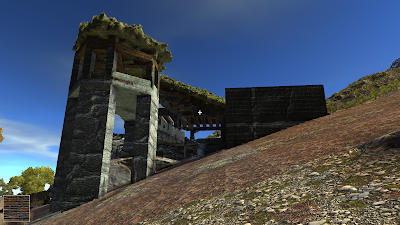
The new tool allowed me to build this cabin, which has a lot of odd angles:
.jpg)


When approaching a new tool design my main concern is to make it simple and fun to use. Voxels are very flexible and very often I feel tempted to add new tools just because I see what they could do. The real problem is how to find a suitable UI. In this particular case it turned out quite simple to use so this one is a keeper.
This is how it works: You point to the start place, hold a key down, and then point to the end place. You see some sort of elastic box showing you where the voxels will appear. Once you release the key, the program will fill the space you have highlighted.
The elastic box changes color depending on how aligned is the box with the absolute grid. If you get perfect alignment is shows in white. If you get alignment over one plane, it shows green. If there is no alignment it shows yellow. As a novice builder you can ignore these changes of color, but they help a lot if you are ready to take notice.

Here is a time-lapse video showing how the entire structure was built. Only three different tools were used here: add/remove voxels, fill and smooth.
Don't ask me why the compression in the video is so bad. YouTube does not like me anymore. I have spent many hours trying many different settings, codecs, anything short of voodoo.
The new tool allowed me to build this cabin, which has a lot of odd angles:
.jpg)


When approaching a new tool design my main concern is to make it simple and fun to use. Voxels are very flexible and very often I feel tempted to add new tools just because I see what they could do. The real problem is how to find a suitable UI. In this particular case it turned out quite simple to use so this one is a keeper.
This is how it works: You point to the start place, hold a key down, and then point to the end place. You see some sort of elastic box showing you where the voxels will appear. Once you release the key, the program will fill the space you have highlighted.
The elastic box changes color depending on how aligned is the box with the absolute grid. If you get perfect alignment is shows in white. If you get alignment over one plane, it shows green. If there is no alignment it shows yellow. As a novice builder you can ignore these changes of color, but they help a lot if you are ready to take notice.

Here is a time-lapse video showing how the entire structure was built. Only three different tools were used here: add/remove voxels, fill and smooth.
Don't ask me why the compression in the video is so bad. YouTube does not like me anymore. I have spent many hours trying many different settings, codecs, anything short of voodoo.
Subscribe to:
Posts (Atom)