Monday, March 21, 2016

Displacement and Beyond

In a previous post I introduced a couple of new systems we are working on. We call them Meta Meshes and Meta Materials. Here is another quick bit of info on how they work. This time we will look at the very basics.

We will start with a very low resolution sphere mesh like this one:
This new system allows me to think of this not just as a mesh, but as a "meta mesh". This is not just a sphere, but the basis of something else that kind-of looks like sphere: a planet, a pebble or maybe your second-grade teacher.

To a meta-object like this one we can apply a meta-material. For the sake of simplicity, in this post I will cover only two aspects of meta-materials. The first is they can use a displacement map to add detail to the surface.

Once you tie a meta-material to a meta-object, you get something tangible, something you can generate and render. Here is how the meta-sphere looks when the displacement equals zero:
This is a reproduction of the original mesh. It still looks very rough and faceted, making you wonder why would you need to go meta in the first place. But here is what you get when you increase the displacement amplitude:

While the shape follows the supplied concept, the detail is procedural. The seed information is the very low resolution sphere and the displacement map, which is applied to the surface using something similar to triplanar mapping. Unlike shader-only techniques, this is real geometry. It will be seen by the collision system, the AI pathfinding and other systems you may lay on top. It is made of voxels, so this is detail you can carve and destroy.

This displacement is applied along the normal of the original meta-object. This would produce beautiful features in vertical cliffs, overhangs and cave ceilings. But often displacement alone is not enough. You may want more complex volumetric protuberances. Luckily meta-materials can also be extended with voxel instances:
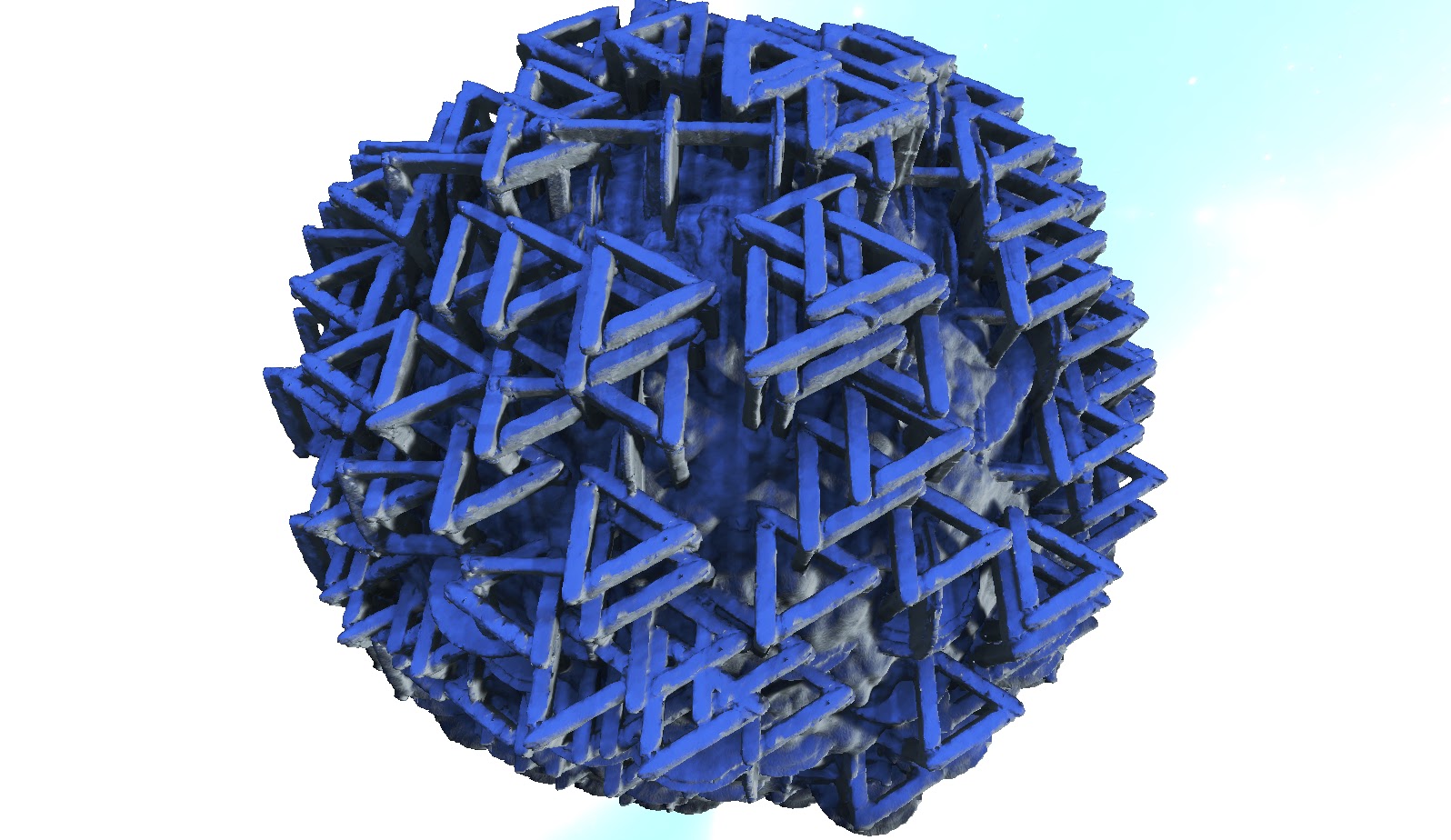

This is a real-time generation system, so there are practical limits on what can be done. I would like to go full fractal on this one, having an infinitude of nested meta materials. It is not really like that in this current iteration of the system. But at this stage the system can be used to produce very impressive content, in particular landscapes. I will be covering that in a soon-to-come post.

Wednesday, February 3, 2016

Improving building LOD

Most rendering engines need some form of level of detail management to deal with complexity. In traditional games there is a lot of hand work going into creating multiple views of the same content. A view of a distant tower in a game is likely crafted as an individual asset, it is not a byproduct of the high-detail version used for closeups. There are some very good commercial solutions to produce multiple LOD for assets, even then a lot of massaging is often required.

In our case we want full automation. Our creation tools should be used by people with no understanding of what LOD means. There is no single silver bullet in this case, it is more like a cocktail of copper bullets, but here is one:

If you think about it, distant LODs are necessarily viewed from afar. This is something we can exploit. Most buildings will have rather simple facades compared to their convoluted interiors. If we know the camera cannot be inside a given LOD version of the building, it is safe to remove whatever complexity is not contributing to the exterior. The result is you can cut a lot of information right away without having to lower the fidelity of the facade at all.

You can see the method in this video:


The method cuts from 80% to 90% of the information. It uses raycasting to determine the likelihood of a portion to be seen from outside. To make it quicker, it first discards portions that are trivially known to be outside. For instance all content that projects directly into the bounding box of the object we know is exposed, so there is no need to test for occlusion. Then it removes the portions we found are never exposed. This produces a rather noisy version of the interior. To this we apply some filters to clean it up and produce the lean shapes you see in the video.

The buildings in the video are voxel creations by Landmark players during EverQuest Next's workshop competitions. They are stunning and at the same time were created by someone who has no knowledge of Maya, 3ds max or traditional 3D modeling. For this very same reason we do not want them to think or worry about how their content looks at different LODs. It just has to work.

Sunday, January 31, 2016

Another UE4 environment run video

Here is another video of Voxel Farm in UE4. This time we are lost somewhere in space:


This is using an Alien Biome we have available as an example. If curious, you can see how this terrain was built here. The biome and tutorial were created by one of our artists, Bohan Sun.

The biome is meant as an example. For this reason it is intentionally simple, but it holds pretty well for exploration as you can see in the video.

I took some time to create a blueprint for the little drone that lights the way for the character. I really enjoyed the experience. I wonder if we could write blueprints for real things, like asking your Roomba to fetch your slippers. There is some serious intelligence you could create with this system, once you have means to feed nav meshes and other actors into it, but I digress.

I hope you liked the video. More Unreal stuff coming later...

Thursday, January 28, 2016

Announcing Unreal Engine 4 support

We got Voxel Farm running in UE4. It s not a plugin yet, but we have included an example project that does all the tricky work. More development is required, but I believe this is at a state where others can benefit from it.

I'm already loving how nicely and quicly the voxel content renders. Here you can see the unreal dude on top of our alien biome:


I was thrilled when it took only a couple of clicks to get a good behaving character. Setting up lighting and atmospherics was also very easy. We are not fully exploiting the shading and many other toys in UE4 so it is bound to get much, mucher better.

Been able to just link to our C++ code makes the collaboration between the two engines a breeze. Thanks to that we can run on ARM platforms like iOS.

I leave you with a rather long run of a character over a Voxel Farm terrain. This is a work-in-pogress biome by a new artist that joined our team, Mr. Bohan Sun. You will also note this is only the bare voxel geometry, it is lacking all instanced meshes like grass, shrubs, smaller stones, etc.


I want to thank Alexander Ostman for donating his Voxel Farm/UE4 integration. This became the base of what we are offering today. Drop me a line if you want to get in contact with him.

Tuesday, January 19, 2016

Riding voxels into the sunset

For creative sandboxes, one recurrent favorite topic is starships, airships and ships in general. It would be very cool if you could actually fly or sail them and, while you do so, continue to build and destroy them.

The clipmap system currently in Voxel Farm sees the entire world as a single monolithic entity. While fragments may be detached from the voxel world, they are kept as meshes and optionally voxelized back into the world when they stop moving.

We are working on a new system that breaks the scene in not only one clipmap, but as many clipmaps as necessary. Here is a video showing the basics of how this works:


The video uses spheres for simplicity. The key here is that each sphere is an object that lives in a different clipmap.

Just like with a single clipmap, portions closer to the camera will get greater resolution, but very unlike the single clipmap, these entities now can be moved around and placed at any arbitrary position, scale or rotation.

Even if the camera is not moving, a given entity may be moving respective to the camera. If the entity approaches it will get higher resolution representation.

I look forward to building a castle, lifting it with massive zeppelin-like devices and exploring the world while comfortably sitting next to a fireplace. Pretty much like Pixar's Up, but with siege weapons.