Thursday, August 27, 2015

Voxel Occlusion

Real time rendering systems (like the ones in game engines) have two big problems to solve: First to determine what is visible from the camera's point of view, then to render what is visible.

While rendering is now a soft problem, finding out what is potentially visible remains difficult. There is a long history of hackery in this topic: BSP trees, PVS, portals etc. (The acronyms in this case make it sound simpler.) These approaches perform well for some cases to then fail miserably in other cases. What works for indoors breaks in large open spaces. To make it worse, these visibility structures take long to build. For an application where the content constantly changes, they are a very poor choice or not practical at all.

Occlusion testing on the other hand is a dynamic approach to visibility. The idea is simple: using a simplified model of the scene we can predict when some portions of the scene become eclipsed by another parts of the scene.

The challenge is how to do it very quickly. If the test is not fast enough, it could still be faster to render everything than to test and then render the visible parts. It is necessary to find out simplified models of the scene geometry. Naturally these simple, approximated models must cover as much of the original content as possible.

Voxels and clipmap scenes make it very easy to perform occlusion tests. I wrote about this before: Covering the Sun with a finger.

We just finished a new improved version of this system, and we were ecstatic to see how good the occluder coverage turned out to be. In this post I will show how it can be done.

Before anything else, here is a video of the new occluder system in action:


A Voxel Farm scene is broken down into chunks. For each chunk the system computes several quads (a four vertex polygon) that are fully inscribed in the solid section of a chunk. They also are as large as possible. A very simple example is shown here, where a horizontal platform produces a series of horizontal quads:


These quads do not need to be axis aligned. As long as they remain inside the solid parts of the cell, they could go in any direction. The following image shows occluder quads going at different angles:


Here is how it works:

Each chunk is generated or loaded as a voxel buffer. You can imagine this as a 3D matrix, where each element is a voxel.

The voxel buffer is scanned along each main axis. The following images depict the process of scanning along one direction. Below there is a representation of the 3D buffer as a slice. If this was a top down view, you can imagine this is a vertical wall going at an angle:
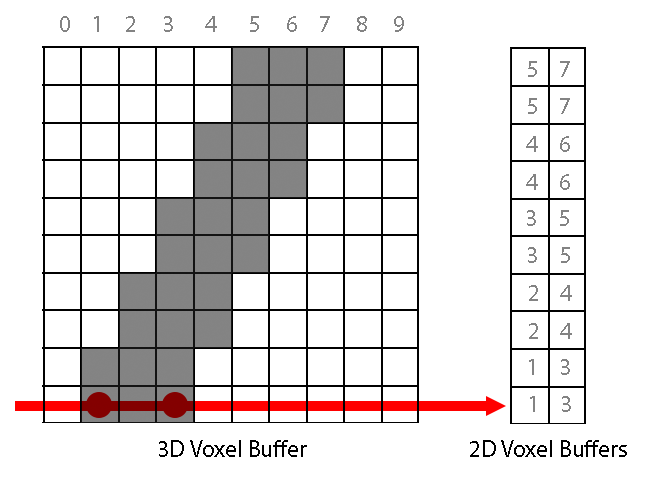
For each direction, two 2D voxel buffers are computed. One stores where the ray enters the solid and the second where the ray exits the solid.

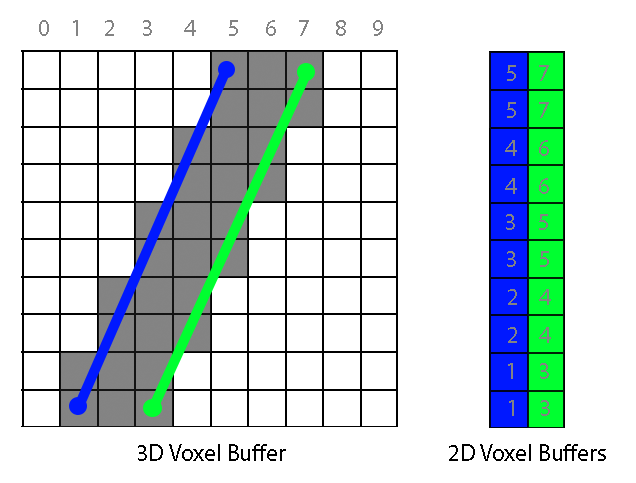
For each 2D buffer, the maximum solid rectangle is computed. A candidate rectangle can grow if the neighboring point in the buffer is also solid and its depth value does not differ more than a given threshold.

Each buffer can produce one quad, showing in blue and green in the following image:
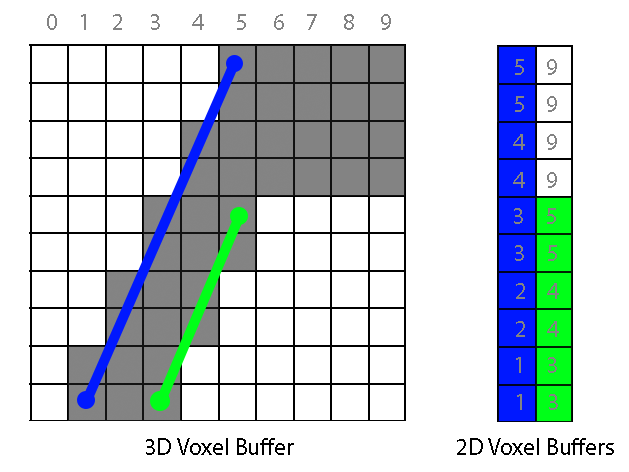
Here is another example where a jump in depth (5 to 9) makes the green occluder much smaller:
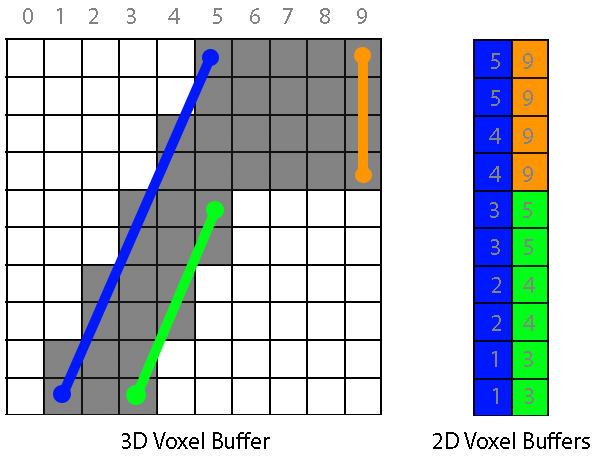
In fact, if we run again the function that finds the maximum rectangle on the second 2D buffer it will return another quad, this time covering the missing piece :
Once we have the occluders for all chunks in a scene, we can test very quickly whether a given chunk in the scene is hidden behind other chunks. Our engine does this using a software rasterizer, which renders the occluder quads to a depth buffer. This buffer can be used to test all chunks in the scene. If a chunk's area on screen is covered in the depth  buffer by a closer depth, it means the chunk is not visible.

This depth buffer can be very low resolution. We currently use a 64x64 buffer to make sure the software rasterization is fast. Here you can see how the buffer looks like:


It is also possible not to use our rasterizer test at all and feed the quads to a system like Umbra. What really matters is not how the test is performed, but how good and simple the occluder quads are.

While this can still be improved, I'm very happy with this system. It is probably the best optimization we have ever done.


Wednesday, August 12, 2015

Texture Grain

So far we have been using triplanar mapping for texturing voxels. This is good enough for terrain but does not look right every time for man-made structures. With triplanar mapping, textures are always aligned to the universal coordinate planes. If you are building features at an angle, the texture orientation ignores that and continues to follow the universal grid. That has been a thorny problem for all voxel creators and enthusiasts out there.

It does not have to be like that anymore. Take a look at this previously impossible structure:


It is two wooden beams going at an angle. The texture grain properly follows the line direction. 

It is not only about lines, this can be applied to any tool. In the following video you can see how curves also preserve the texture grain:


This new ability is a nice side effect of including UV mapping information in voxels. This is no different than the zebras and leopards we stamped into the world in earlier videos, in this case the tool comes up with the UV mapping information on-the-fly.

UV mapped voxels are not yet released in Voxel Farm, it is just now we got to work on the tools so they take full advantage of them, but it really looks to me this will take our engine to a whole new level.

Saturday, July 4, 2015

Export your creations

We just completed a new iteration on the FBX export feature. This new version is able to bake textures along with the geometry. Check it out in this video:


The feature seems rather simple to the user, however there are massive levels of trickery going on under the hood.

When you look at a Voxel Farm scene  a lot of what you see is computed in realtime. The texturing of individual pixels happens in the GPU where the different attributes that make each voxel material are evaluated on the fly. If you are exporting to a static medium, like an FBX file, you cannot have any dynamic elements computed on the fly. We had no choice but to bake a texture for each mesh fragment.

The first step is to unwrap the geometry and make it flat so it fits a square 2D surface. Here we compute UV coordinates for each triangle. The challenge is how to fit all triangles in a square while minimizing wasted space and any sort of texture distortion.

Here is an example of how a terrain chunk is unwrapped into a collection of triangles carefully packed into a square:


The image also shows that different texture channels like diffuse and normal can then be written into the final images. That is the second and last step, but there is an interesting twist here.

Since we are creating a texture for the mesh anyway, it would be a good opportunity to include features not present in the geometry at the current level of detail. For instance, consider these tree stumps that are rendered using geometry at the highest level of detail:


Each subsequent level of detail will have less resolution. If we go ahead five levels, the geometric resolution won't be fine enough for these stumps to register. Wherever there was a stump, we may get now just a section of a much larger triangle.

Now, for the FBX export we are allocating unique texture space for these triangles. At this level of detail the texture resolution may still be enough for the stumps to register. So instead of evaluating the texture for the low resolution geometry, we project a higher resolution model of the same space into the low detail geometry. Here you can see the results:


Note how a single triangle can contain the projected image of a tree stump.

This process is still very CPU intensive as we need to compute higher resolution versions for the low resolution cells. This iteration was mostly about getting the feature working and available for users. We will be optimizing this in the near future.

The algorithms used here are included in the SDK and engine source code. This sort of technique is called "Detail Transfer" or "Detail Recovery". It is also the cornerstone for a much better looking LOD system, as very rich voxel/procedural content can be captured and projected on top of fairly simple geometry.

Friday, June 26, 2015

Castle by the lake

Here is a castle made using our default castle grammar set. This was capture from a new version of the Voxel Studio renderer we will be rolling out soon. The rendering is still work in progress (the texture LOD transitions are not blended at all, the material scale is off, etc.) so some imagination on your side is required. Also the castle is partially completed as we intend to fill the little island.


There are no mesh props here, everything on screen comes from voxels. Also there are no handmade voxel edits, this is strictly the output of grammars. Also note that the same few grammars are applied over and over. For instance curved walls are created with the same wall grammar used for the straight walls, they just run in a curved scope.


This is a scene we are creating to test some new cool systems we are developing to handle high density content.

Sunday, May 31, 2015

Evolution of Procedural

This post is mostly about how I feel about procedural generation and where we will be going next.

A couple of months ago we released Voxel Farm and Voxel Studio. Many of you have already played with it and often we get the same questions: why so much focus on artist input, what happened to building entire worlds with the click of a button?

The short answer is "classic" real time procedural generation is bad and should be avoided, but if you stop reading here you will get the wrong idea, so I really encourage you to get to my final point.

While you can customize our engine to produce any procedural object you may think of, our current out-of the-box components favor artist generated content. This is how our current workflow looks like:


It can be read like this: The world is the result of multiple user-supplied data layers which are shuffled together. Variety is introduced at the mixer level, so there is a significant procedural aspect to this, but at the same time the final output is limited to combinations of the samples provided by a human as input files.

This approach is fast enough to allow real time generation, and at the same time it can produce interesting and varied enough results to keep humans interested for a while. The output can be incredibly good, in fact as good as the talent of the human who created the input files. But here is also the problem. You still need to provide reasonably good input to the system.

This is the first piece of bad news. Procedural generation is not a replacement for talent. If you lack artistic talent, procedural generation is not likely to help much. You can amplify an initial set into a much larger set, but you can't turn a bad set into a good one. A microphone won't make you a good singer.

The second batch of bad news is the one you should worry about: Procedural generation has a cost. I have posted about this before. You cannot make something out of nothing. Entropy matters. It takes serious effort for a team of human creators to come up with interesting scenes. In the same way, you must pay a similar price (in energy or time) when you synthesize something from scratch. As a rule of thumb, the complexity of the system you can generate is proportional to the amount of energy you spend. If you think you can generate entire planets on-the-fly on a console or PC, you are up for some serious disappointment.

I will be very specific about this. Procedural content based on local mathematical functions like Perlin, Voronoi, etc. cannot hold our interest and it is guaranteed to produce boring content. Procedural content based on simulation and AI can rival human nature and what humans create, but it is not fast enough for real time generation.

Is there any point in pursuing real time procedural generation? Absolutely, but you have to take it for what it is. As I see it, the only available path at this point is to have large sets of interesting content that can be used to produce even larger sets, but there are limits for how much you can grow the content before it becomes predictable.

For real time generation, our goal will be to help people produce better base content sets. These could be produced on-the-fly, assuming the application allows some time and energy for it. 

Here is where we are going next:


Hopefully that explains why we chose to start with a system that can closely obey the instructions of an artist. Our goal is to replace human work by automating the artist, not by automating the subject. We have not taken a detour, I believe this is the only way.